

What is this feature?
The AI Assisted Builder helps you improve your app’s instructions. While you test your app in the builder preview, pick a reply you want to change and describe what’s wrong. The AI Assisted Builder explains what to change and suggests an edit to one part of your instructions.How does this feature work?
Rationale for the feature
Building apps can be complex and time-consuming. This AI assistant helps you improve your prompts by providing suggestions and structures for your Playlab prompt.Watch how to use Assisted Builder
1
Open your app in the builder
There’s nothing to turn on. Assisted Builder is available in the builder preview of any app you can edit.
2
Find a reply to improve
Chat with your app in the builder preview and find an AI reply you want to change.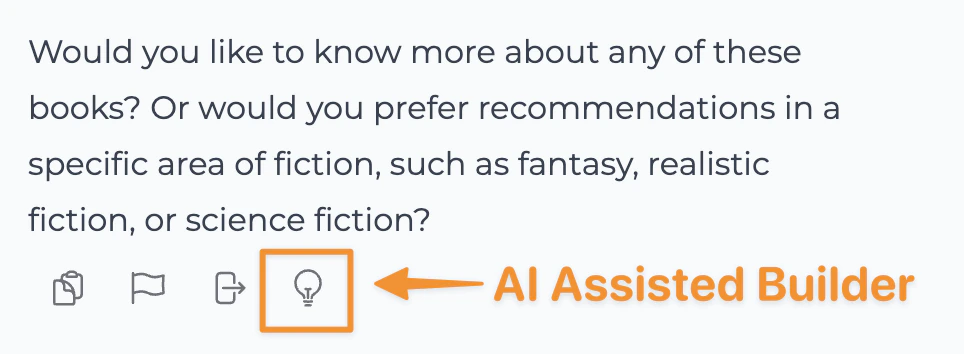
3
Ask for a suggestion
Click the lightbulb (Improve this response) under that reply, type what you want changed, and press Enter. You’ll see an explanation, the Original: part of your instructions, and a Suggested Edit:. If it decides no change is needed, you only see the explanation. Copy the suggested edit into your instructions yourself; Assisted Builder doesn’t change your app.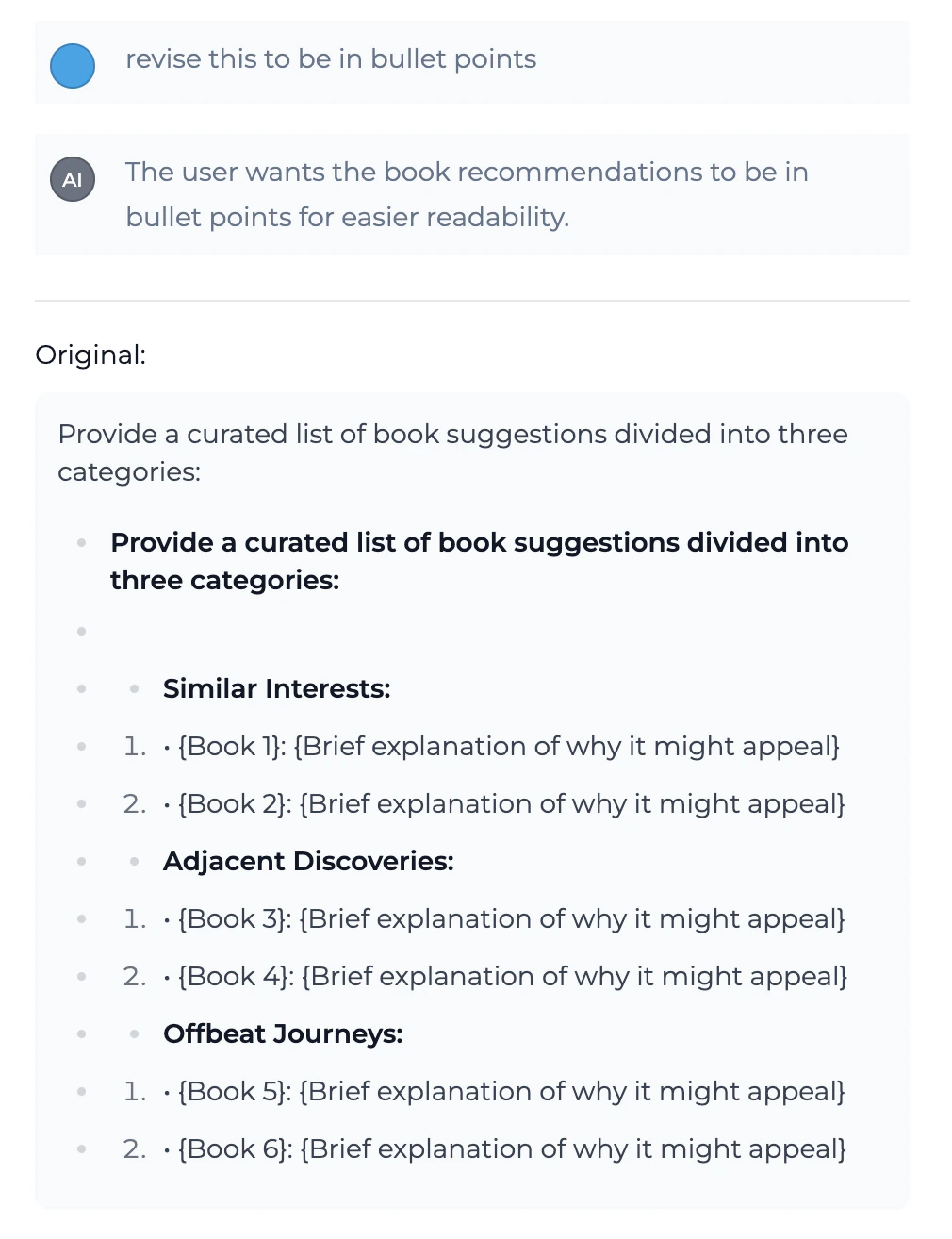
Tips for Using Assisted Builder Effectively
Best Practices
Clearly define your project requirements
Clearly define your project requirements
Provide detailed information about your app’s purpose, target audience, and key features to receive more relevant assistance.
Review and understand AI suggestions
Review and understand AI suggestions
Don’t blindly accept all suggestions. Take time to understand the reasoning behind recommendations and how they fit your specific needs.
Iterate and refine
Iterate and refine
If a suggestion misses, ask again with more specific feedback about what the reply got wrong and what you want instead.
Combine AI assistance with human expertise
Combine AI assistance with human expertise
Use the AI Assisted Builder as a powerful tool to augment your skills, not replace your decision-making and creative input.
FAQ
How does Assisted Builder learn about my preferences?
How does Assisted Builder learn about my preferences?
The AI Assisted builder has been designed to leverage its understanding of building impactful Playlab apps to support you in your building by offering tailored feedback and suggestions.
Can I disable specific types of assistance?
Can I disable specific types of assistance?
Yes, you can pick and choose when to use the assisted builder when you would like or not.
Will Assisted Builder work with my existing app?
Will Assisted Builder work with my existing app?
Yes. It works in the builder preview of any app you can edit. It reads your app’s current instructions, the preview conversation up to the reply you picked, and your feedback, then suggests an edit to one part of the instructions. It never changes your app itself: copy the Suggested Edit into your instructions if you want it.
Is my app data secure when using Assisted Builder?
Is my app data secure when using Assisted Builder?
Assisted Builder sends your app’s instructions, the preview conversation up to that reply, and your feedback to Playlab’s revision assistant. That request and the suggestion it returns are saved in Playlab as a session of the revision assistant, like other Playlab sessions.
Important Considerations
Always review AI-generated suggestions before adding it to your prompt and publishing your Playlab app. While Assisted Builder provides intelligent suggestions, human oversight is essential for quality and security. Assisted Builder is designed to enhance your development process, not replace your expertise. Use it as a powerful tool to accelerate development while maintaining control over your app’s architecture and design decisions.We Want Your Feedback!
Have you used Assisted Builder to create something amazing? We’d love to hear about your experience and any suggestions for improvement! Contact us at [email protected]Last updated: 10-02-2026